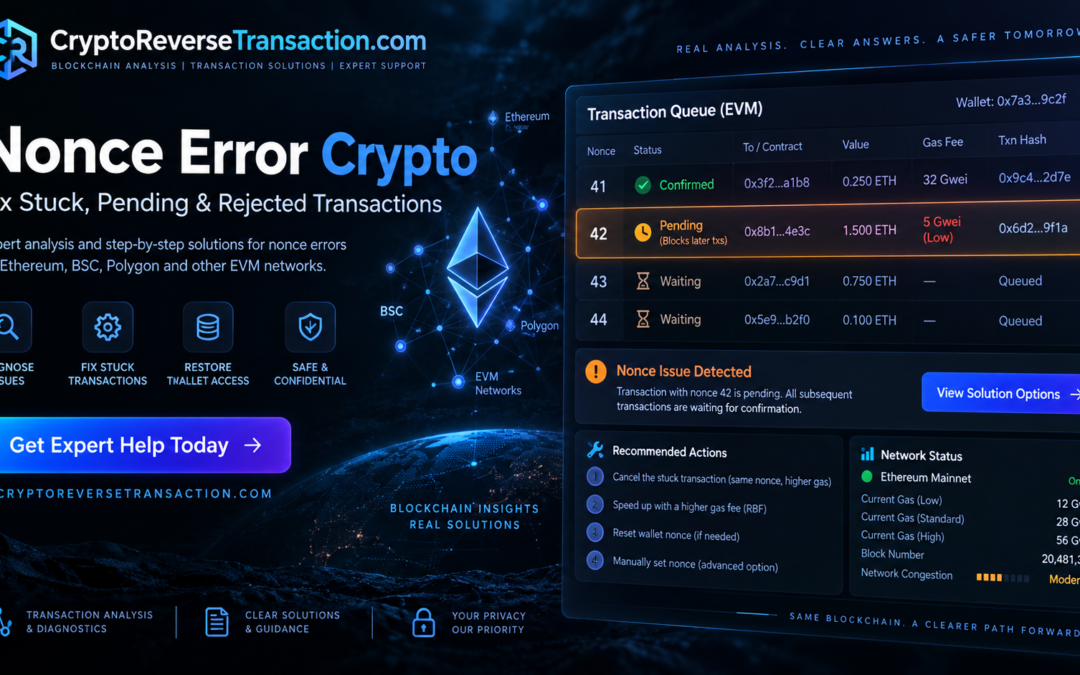
A nonce error crypto problem can make a wallet appear frozen even when the funds themselves are still secure. You may try to send another transaction and receive an error such as “nonce too low,” “replacement transaction underpriced,” “already known,” or another message indicating that the transaction cannot currently be accepted.
These problems are particularly common on Ethereum and other EVM-compatible networks because transactions from the same account are processed according to a sequential nonce system. Networks such as BNB Smart Chain and Polygon also use account nonces, although network conditions, wallet behavior, gas markets, and node policies can differ.
When a nonce error crypto issue occurs, the first step is not to repeatedly resend transactions. The important question is what nonce the blockchain has already accepted, what transactions remain pending, and what your wallet believes the next nonce should be.
MetaMask describes a nonce as a transaction number that starts at 0 and increases sequentially for transactions sent by an account. It also explains that transactions from the same account must proceed in increasing nonce order.
At CryptoReverseTransaction.com, transaction troubleshooting can begin with identifying the network, wallet, transaction hash, nonce, and current blockchain status. You can start with the Crypto Reverse Transaction homepage or submit information through the case consultation page.
What Is a Nonce in Crypto?
A nonce is a sequential transaction identifier associated with an account on an EVM blockchain.
For example, suppose an account has already completed transactions using nonces:
- 0
- 1
- 2
- 3
- 4
The next transaction normally uses nonce 5.
After nonce 5 is confirmed, the next transaction can use nonce 6, followed by 7, 8, and so on.
This ordering is important because the network cannot simply process nonce 8 while nonce 5 from the same account is still unresolved. A transaction with a later nonce may remain queued until earlier transactions are dealt with.
This is one reason a single nonce error crypto problem can appear to affect several later transactions.
Example
Imagine the following transaction sequence:
| Nonce | Status |
|---|---|
| 40 | Confirmed |
| 41 | Confirmed |
| 42 | Pending |
| 43 | Queued |
| 44 | Queued |
If nonce 42 remains pending, transactions 43 and 44 may not be confirmed before it.
That does not necessarily mean the funds associated with transactions 43 and 44 have disappeared. It can simply mean the account’s transaction sequence has not progressed.
What Causes a Nonce Error Crypto Problem?
There are several possible causes of a nonce error crypto situation.
1. A transaction is still pending
A transaction may have been broadcast with a fee that the network is currently unwilling or unable to process promptly.
If a later transaction is submitted with a higher nonce, the later transaction may remain queued.
2. The wallet is using an outdated nonce
Sometimes the wallet interface does not accurately reflect what has happened on the blockchain.
This can happen after:
- Using multiple wallet interfaces
- Importing the same account into different applications
- Broadcasting transactions from more than one interface
- A transaction being dropped from a node’s mempool
- Wallet activity becoming out of sync
- Software or RPC-related issues
MetaMask specifically notes that using the same account from different MetaMask instances at the same time can create nonce-related problems.
3. “Nonce too low”
The “nonce too low” error generally means that the transaction is attempting to use a nonce that the network considers already used or no longer valid for a new transaction.
For example, if the network has already accepted nonce 42, attempting to submit another ordinary transaction using nonce 42 may produce a nonce-related rejection.
This is different from having a transaction that is simply taking a long time to confirm.
4. Replacement transaction problems
A user may attempt to replace a pending transaction but fail because the replacement does not satisfy the network or node’s replacement requirements.
This can result in messages such as:
“replacement transaction underpriced.”
The exact replacement requirements can vary by network and client, so a fixed rule such as “always increase gas by exactly 10%” should not be treated as universal.
MetaMask’s current guidance for manual cancellation includes increasing the priority fee and maximum fee sufficiently relative to the original transaction, while checking current network conditions.
Why One Stuck Transaction Can Block Later Transactions
Understanding this sequence is one of the most important parts of solving a nonce error crypto issue.
Suppose you send:
- Transaction A — nonce 50
- Transaction B — nonce 51
- Transaction C — nonce 52
If transaction 50 remains pending, the later transactions may remain queued.
The wallet can therefore look as though several transactions are broken when the underlying issue is concentrated around the earliest unresolved nonce.
This is why repeatedly clicking Send is usually not the correct response.
Instead, examine the transaction sequence.
A useful investigation should identify:
- The wallet address
- The blockchain
- The last confirmed nonce
- The pending nonce
- Any queued transactions
- The transaction hashes
- Current network status
- Whether the transaction is visible on a block explorer
- Whether the transaction can still be replaced
- Whether the transaction has already been confirmed
For Ethereum transactions, a block explorer such as Etherscan can help you inspect transaction hashes and account activity. For BNB Smart Chain, BscScan provides similar blockchain transaction information.
Stuck Pending Transaction vs. Confirmed Transaction
This distinction is critical.
A pending transaction has not yet been included in a confirmed block.
A confirmed transaction has already been included in the blockchain.
Those two situations require completely different approaches.
MetaMask explicitly states that a cancellation can only be attempted while the transaction is still pending. Once a transaction has been confirmed, it cannot simply be reversed through the wallet interface.
Therefore, before attempting a cancellation, determine the actual blockchain status.
Do not rely solely on the wallet’s activity screen.
A wallet may display outdated information while the blockchain explorer shows that the transaction has already been confirmed, failed, or dropped.
How to Diagnose a Nonce Error Crypto Issue
A proper nonce error crypto diagnosis begins with evidence.
Step 1: Identify the blockchain
Determine whether the transaction is on:
- Ethereum
- BNB Smart Chain
- Polygon
- Base
- Arbitrum
- Optimism
- Another EVM-compatible network
Do not assume that a procedure is identical across every EVM network.
Step 2: Find the transaction hash
The transaction hash, sometimes called the transaction ID or TXID, allows you to inspect the transaction independently of the wallet interface.
If you have a transaction hash, search it using the appropriate blockchain explorer.
Step 3: Locate the nonce
Look at the transaction details and identify the nonce assigned to the transaction.
Then compare it with the surrounding transactions from the same address.
Step 4: Find the earliest unresolved transaction
If several transactions appear pending, identify the lowest unresolved nonce.
For example:
| Nonce | Status |
|---|---|
| 61 | Confirmed |
| 62 | Confirmed |
| 63 | Pending |
| 64 | Pending |
| 65 | Pending |
The investigation should begin with nonce 63 rather than immediately attempting to manipulate nonce 65.
MetaMask’s guidance similarly explains that when using custom-nonce cancellation, users should work from the oldest pending transaction in the sequence.
How to Cancel a Stuck Transaction
One common method for dealing with a still-pending transaction is to submit a replacement transaction using the same nonce.
In a traditional manual cancellation approach, the replacement can be a zero-value transaction sent back to the same wallet address.
The important elements are:
- Same sending account
- Same nonce
- Appropriate replacement fee
- Correct network
- Transaction still pending
MetaMask documents this method and explains that a custom-nonce cancellation can use a zero-value transaction to the user’s own address.
However, this should not be treated as a guaranteed cancellation mechanism.
The replacement transaction must actually be accepted by the network. If the original transaction has already been confirmed, sending another transaction with that nonce will not reverse what happened.
This is why checking the transaction status first is essential.
Speeding Up a Pending Transaction
Another option is to replace the pending transaction with another transaction using the same nonce and higher fees.
This is commonly described as speeding up the transaction.
The purpose is not to create an additional transaction in the sequence. Instead, the replacement attempts to take the place of the pending transaction.
MetaMask explains that its speed-up process resubmits the same transaction with higher gas fees while reusing the original nonce.
The actual fee required depends on network conditions and replacement rules.
Therefore, avoid copying an old gas price from another transaction and assuming it will work.
Check the current network conditions and the wallet’s current fee recommendations.
What Does “Replacement Transaction Underpriced” Mean?
A replacement transaction underpriced error generally means the replacement transaction did not offer sufficient fee improvement for the node or network to accept it as a replacement.
For example:
- Original transaction: nonce 50
- Original fee: lower
- Replacement: nonce 50
- Replacement fee: only slightly higher
The node may reject the replacement.
The exact requirements can vary according to the network and transaction type.
MetaMask’s current cancellation documentation provides specific fee-increase guidance for its interface, including higher priority and maximum fees, while recommending checking current gas conditions.
The important principle is:
Do not assume every network uses the same replacement threshold.
Does Resetting MetaMask Fix a Nonce Error?
Sometimes clearing wallet activity can help when the wallet interface has become out of sync, but it is important to understand what this does.
MetaMask currently calls the extension feature “Delete activity and nonce data,” while the mobile application may still use the term “Reset account.” MetaMask warns that this process should only be used when necessary and explains that it clears the wallet application’s transaction history for the current network.
This is an important distinction:
Resetting account activity does not erase blockchain transactions.
It changes what the wallet application remembers locally.
It also does not reverse a confirmed transaction.
It should therefore not be confused with resetting the entire wallet.
MetaMask separately explains that a full wallet reset is different and can remove accounts from the software, potentially requiring the Secret Recovery Phrase to restore access.
For that reason, users should never casually reset the entire wallet when attempting to solve a nonce error crypto problem.
When Custom Nonce Settings Are Useful
Advanced users may manually specify the nonce when sending a transaction.
This can be useful when:
- A pending transaction needs replacement
- The wallet is displaying incorrect activity
- A transaction sequence needs to be carefully reconstructed
- You understand the account’s current nonce state
MetaMask provides a custom nonce feature for situations such as speeding up or cancelling pending transactions.
But manually entering a nonce without understanding the existing transaction sequence can create additional confusion.
Before manually setting a nonce, determine:
What is the latest confirmed nonce?
What transactions are pending?
Which nonce is blocking the sequence?
Has the transaction already been confirmed?
These questions are more important than simply changing the number displayed by the wallet.
Nonce Errors on BNB Smart Chain and Polygon
The concept of a nonce error crypto issue is not limited to Ethereum.
BNB Smart Chain and Polygon are also EVM-compatible environments, meaning developers and wallets encounter similar account-nonce concepts.
However, users should still verify the specific transaction on the correct network explorer.
For example:
- Ethereum → Etherscan
- BNB Smart Chain → BscScan
- Polygon → PolygonScan
Using the wrong network explorer can make a perfectly valid transaction appear to be missing.
This is particularly important when the same wallet address is used across multiple EVM networks.
The address can look identical while the transaction history is completely different from one network to another.
A Nonce Error Does Not Automatically Mean Crypto Was Stolen
This is one of the most important points for anyone experiencing a nonce error crypto problem.
A stuck transaction is fundamentally different from a wallet-draining attack.
A nonce problem can prevent transactions from progressing, but it does not by itself establish that someone has stolen the wallet’s assets.
Before assuming compromise, inspect the blockchain.
Look for:
- Unknown outgoing transfers
- Unauthorized token approvals
- Unexpected contract interactions
- Unknown destination addresses
- Suspicious signatures
- Unfamiliar transactions
- Changes in token balances
If you discover unauthorized transactions, the investigation becomes a broader wallet-security or transaction-forensics matter rather than merely a nonce troubleshooting problem.
You can review the CryptoReverseTransaction.com About Us page to understand the company’s stated approach, while the Terms & Conditions should be reviewed before requesting any service.
Protect Your Wallet While Fixing a Nonce Problem
A nonce problem can create a stressful situation, especially when a significant transaction is waiting.
That is precisely when users should be careful about people offering “instant fixes.”
Never provide your:
- Secret Recovery Phrase
- Private key
- Wallet password
- Hardware-wallet PIN
- Authentication codes
A legitimate technical troubleshooting process should not require another person to take possession of your wallet credentials.
MetaMask also warns users about protecting their Secret Recovery Phrase and explains that resetting a wallet can require the recovery phrase to restore access.
If someone contacts you claiming they can “unlock” a nonce problem but asks you to send your recovery phrase first, stop the conversation.
Nonce Error Crypto: A Practical Diagnostic Checklist
Before attempting to cancel, replace, or reset anything, collect the following information:
Wallet information
- Wallet application
- Public wallet address
- Network being used
Transaction information
- Transaction hash
- Nonce
- Transaction status
- Gas settings
- Destination address
- Contract address, if applicable
Error information
- “Nonce too low”
- “Replacement transaction underpriced”
- “Already known”
- “Transaction pending”
- Other exact error message
Sequence information
- Last confirmed nonce
- First pending nonce
- Later queued transactions
- Any transactions submitted through another wallet interface
This information can often reveal whether the issue is actually a nonce problem, a fee problem, a wallet-interface problem, or a different blockchain error entirely.
How CryptoReverseTransaction Can Approach a Nonce Error Crypto Case
For a nonce error crypto case, the useful starting point is transaction evidence rather than assumptions.
A case review can focus on:
- Identifying the blockchain.
- Checking the wallet address.
- Examining the transaction hash.
- Comparing confirmed and pending nonces.
- Identifying the earliest unresolved transaction.
- Determining whether the transaction is still pending.
- Reviewing whether replacement is technically available.
- Checking whether wallet activity is out of sync.
- Identifying whether a broader security issue exists.
- Explaining the available technical options.
If you need assistance reviewing a transaction sequence, you can use the CryptoReverseTransaction case consultation page and provide the transaction information needed for analysis.
The objective should be to understand what the blockchain actually shows before taking an irreversible action.
Key Takeaway
A nonce error crypto problem can look more serious than it actually is because one unresolved transaction can prevent later transactions from progressing.
The most important steps are:
- Identify the correct blockchain.
- Locate the transaction hash.
- Check the transaction directly on a block explorer.
- Identify the nonce.
- Find the earliest unresolved transaction.
- Determine whether it is pending, confirmed, failed, or dropped.
- Consider replacement or cancellation only while appropriate.
- Avoid changing wallet settings blindly.
- Never share your private key or Secret Recovery Phrase.
- Investigate separately if unauthorized transfers are present.
A nonce error crypto problem is fundamentally a transaction-ordering issue. Understanding the nonce sequence first makes it much easier to determine what can actually be done next.
For further information and case assistance, visit Crypto Reverse Transaction or review the company’s Success Stories and Testimonials.
Advanced Nonce Error Crypto Troubleshooting, Wallet Recovery & Transaction Analysis
When a nonce error crypto problem continues after basic troubleshooting, the issue may require a more detailed examination of the wallet’s transaction history, network state, replacement transactions, and the relationship between confirmed and pending transactions.
A simple wallet reset is not always the right solution. In some cases, the transaction has already been confirmed. In others, the wallet may be displaying stale information while the blockchain has moved forward. There are also situations where several transactions were broadcast from different interfaces, creating a sequence that is difficult to understand from the wallet application alone.
This section goes deeper into advanced nonce error crypto troubleshooting, including transaction sequencing, replacement transactions, RPC synchronization, multiple wallet interfaces, cross-chain considerations, and security checks.
Understanding the Difference Between Nonce, Gas and Transaction Status
A nonce error crypto issue is often confused with a gas problem.
Although nonce and gas can interact, they represent different concepts.
The nonce determines the transaction’s position in the account’s sequence.
Gas fees determine how much the sender is willing to pay for transaction execution and inclusion.
Transaction status describes what ultimately happened to the transaction.
For example:
- Nonce: 42
- Gas fee: 10 Gwei
- Status: Pending
Changing the gas fee does not change the nonce.
Likewise, changing the nonce does not automatically increase the transaction’s fee.
This distinction is essential when diagnosing a nonce error crypto problem.
A transaction can have:
- A correct nonce but insufficient fee.
- An incorrect nonce but sufficient fee.
- A correct nonce and adequate fee but another transaction already occupying that nonce.
- A pending status caused by network conditions rather than a wallet malfunction.
Therefore, troubleshooting should examine the complete transaction rather than focusing exclusively on the error message.
The Importance of the Earliest Pending Nonce
Suppose a wallet shows:
| Nonce | Transaction | Status |
|---|---|---|
| 100 | Transaction A | Confirmed |
| 101 | Transaction B | Confirmed |
| 102 | Transaction C | Pending |
| 103 | Transaction D | Pending |
| 104 | Transaction E | Pending |
The first transaction requiring attention is generally nonce 102.
Trying to manipulate nonce 104 without understanding nonce 102 can make the situation more complicated.
This is why advanced nonce error crypto analysis begins with transaction ordering.
The investigator should reconstruct the sequence from the blockchain rather than relying only on the wallet’s visual queue.
A useful record might look like:
Wallet → Network → Last Confirmed Nonce → First Pending Nonce → Subsequent Nonces → Current Status
Once this sequence is established, it becomes much easier to determine whether the wallet is actually stuck or whether the interface is simply displaying outdated transaction information.
When a Transaction Has Already Been Confirmed
One of the most important rules in nonce error crypto troubleshooting is that a confirmed blockchain transaction is fundamentally different from a pending transaction.
If a transaction has been included in a block, it cannot be cancelled simply because the sender later changes their mind.
For example:
Nonce 55 → Confirmed
If the transaction transferred ETH, BNB, or tokens to another address, creating another transaction with nonce 55 does not undo the original transfer.
The original transaction remains part of the blockchain history.
This is why users should always inspect the transaction hash before attempting a cancellation.
For Ethereum, Etherscan provides transaction and address information. For BNB Smart Chain, BscScan can be used. Polygon users can use PolygonScan.
The objective is to establish the actual blockchain state first.
Dropped Transactions and Why They Cause Confusion
A particularly confusing nonce error crypto situation occurs when a wallet shows a transaction as pending even though the transaction is no longer present in the network’s active transaction pool.
A transaction may disappear from a node’s mempool without being confirmed.
This does not necessarily mean the transaction was permanently rejected by the blockchain.
A wallet interface may continue displaying historical activity even though the network is ready to accept another transaction using that nonce.
This is one reason wallet applications and blockchain explorers can sometimes appear to disagree.
The correct response is not to assume that one interface is automatically correct.
Instead, examine:
- Transaction hash
- Block inclusion
- Nonce
- Sender
- Recipient
- Transaction status
- Current account sequence
- Network being queried
A transaction that is genuinely absent from the blockchain can require a different approach from a transaction that remains pending.
RPC Problems and Nonce Errors
Another source of nonce error crypto problems can be the blockchain RPC endpoint used by a wallet.
RPC, or Remote Procedure Call, allows a wallet or application to communicate with a blockchain node.
When an RPC endpoint is slow, unavailable, overloaded, or returning stale information, the wallet can potentially display information that does not perfectly reflect another node’s current view.
This becomes particularly important when users:
- Switch RPC providers
- Use custom networks
- Use several wallet applications
- Connect through third-party DApps
- Submit transactions through different interfaces
A wallet may obtain the account’s pending state from one node while another node has a different view of the transaction pool.
That does not necessarily mean the blockchain itself is corrupted.
It may simply mean the wallet and node infrastructure need to be examined.
Using Multiple Wallet Interfaces
A wallet address can sometimes be accessed through more than one interface.
For example, the same EVM account may be imported or connected to:
- MetaMask
- Rabby
- MyEtherWallet
- Another compatible wallet interface
- A hardware-wallet interface
- A DApp using an external transaction system
The underlying blockchain account remains the same, but different interfaces may maintain different local transaction information.
This can contribute to a nonce error crypto problem.
MetaMask specifically warns about using the same account in multiple MetaMask instances simultaneously because this can lead to nonce-related problems. MetaMask transaction guidance
For troubleshooting, it is useful to establish:
Which interface originally broadcast the transaction?
Which interface is currently being used?
Were other transactions sent from another application?
Did the user change networks or RPC endpoints?
These details can explain apparently inconsistent nonce information.
Advanced Replacement Transaction Analysis
A replacement transaction attempts to use the same nonce as an existing pending transaction.
For example:
Original
Nonce: 75
Status: Pending
Replacement
Nonce: 75
Status: Broadcast
The intention is for the replacement transaction to be accepted instead of the original.
However, a replacement is not guaranteed to work merely because it uses the same nonce.
The replacement must satisfy the relevant network and node policies.
This is why an error such as:
“replacement transaction underpriced”
may appear.
The correct fee requirements depend on the network, transaction type, wallet implementation, and node configuration.
Consequently, blindly increasing the gas fee by an arbitrary percentage is not a universal solution.
Cancelling a Pending Transaction
For a genuine pending transaction, cancellation may be possible by broadcasting a replacement transaction with the same nonce.
A common manual approach is:
From: Your wallet
To: Your own wallet
Value: 0
Nonce: Same as pending transaction
Fee: Appropriate replacement fee
The purpose is to replace the earlier pending transaction rather than to reverse a confirmed transaction.
MetaMask provides documentation for speeding up or cancelling pending transactions and explains the use of the same nonce for replacement. MetaMask speed-up and cancellation guide
Before performing the operation, however, verify that the original transaction remains pending.
If it has already been confirmed, cancellation is no longer the correct approach.
What Happens After a Replacement Is Confirmed?
Suppose:
Original transaction: nonce 75 → pending
A replacement transaction is submitted:
Replacement: nonce 75 → confirmed
The account’s transaction sequence can then progress to:
Nonce 76 → available for subsequent transaction
The original transaction does not also execute as a separate transaction because the same nonce cannot be successfully executed twice by the same account.
This is why nonce replacement can resolve a blocked transaction sequence when used correctly.
However, users should still verify the resulting blockchain state rather than assuming the replacement succeeded.
Token Transactions and Nonce Problems
A nonce error crypto issue can occur when sending more than just the native blockchain asset.
For example, a wallet may send:
- ETH
- USDT
- USDC
- Other ERC-20 tokens
- NFTs
- DeFi transactions
- Contract interactions
Even when the transaction involves a token, the underlying EVM transaction from the wallet still uses an account nonce.
For example:
Wallet → USDT contract → transfer()
The transaction has a nonce associated with the sending wallet.
Therefore, a wallet that has a pending contract interaction may also experience problems when trying to send an ordinary ETH transfer afterward.
This is another reason not to assume that the issue is limited to ETH transfers.
Nonce Errors During DeFi Transactions
DeFi applications can make nonce troubleshooting more complicated because transactions may involve smart contracts rather than simple wallet-to-wallet transfers.
A pending transaction might represent:
- Token approval
- Token swap
- Liquidity deposit
- Liquidity withdrawal
- NFT mint
- Contract interaction
- Bridge transaction
- Staking transaction
If the transaction is stuck, later transactions from the same account may be affected.
The transaction hash should therefore be inspected before attempting to cancel it.
A user should understand exactly what the original transaction was designed to do.
If an unknown contract is involved, additional security investigation may be appropriate.
For example, an unexplained token approval is different from a normal transfer to a known exchange.
Nonce Error Crypto vs. Wallet Compromise
A nonce error crypto problem should not automatically be classified as a security breach.
A wallet can have a perfectly normal nonce problem while all funds remain under the user’s control.
However, nonce troubleshooting is also an opportunity to check for unauthorized activity.
Review the wallet for:
- Unknown outgoing transfers
- Unexpected contract calls
- Unfamiliar token approvals
- Unknown DApp interactions
- Unexpected NFT transfers
- New transactions that the user did not authorize
If unauthorized transactions are discovered, the case should be treated as a potential wallet-security incident rather than simply a transaction-ordering problem.
If remaining assets are at risk, consider moving them to a secure wallet using a clean device and trusted wallet software, where appropriate.
Never expose the recovery phrase while seeking technical help.
Checking Token Approvals During a Wallet Investigation
A wallet experiencing transaction problems may also have interacted with suspicious smart contracts.
For EVM wallets, users can inspect token approvals using tools such as Revoke.cash.
Ethereum users can also examine contract and transaction information through Etherscan.
The purpose of checking approvals is not to assume that every approval is malicious.
Many legitimate DeFi applications require token approvals.
Instead, look for approvals that are:
- Unexpected
- Associated with unfamiliar applications
- No longer required
- Excessively broad
- Connected to an interaction the wallet owner does not recognize
Revoking an approval also does not automatically recover tokens that have already been transferred.
This distinction matters because prevention and recovery are different stages of an investigation.
Cross-Chain Nonce Error Crypto Troubleshooting
EVM-compatible networks can look similar from the user’s perspective, but each network maintains its own blockchain state.
For example, the same wallet address might exist on:
- Ethereum
- BNB Smart Chain
- Polygon
- Base
- Arbitrum
- Optimism
The address can be identical across networks while its transaction history differs.
A transaction on Ethereum does not automatically occupy the same transaction sequence on another independent network.
Therefore, if someone reports a nonce error crypto problem, the first question should be:
Which network?
Not merely:
Which wallet?
The wallet application alone is not enough to identify the blockchain state.
Hardware Wallets and Nonce Problems
Hardware wallets add another layer to transaction troubleshooting.
Devices from manufacturers such as Ledger and Trezor are designed to keep private keys protected while allowing users to approve transactions.
A nonce problem does not necessarily indicate that the hardware device itself is defective.
The issue may instead involve:
- Wallet software
- RPC synchronization
- Network selection
- Pending transactions
- Transaction replacement
- Account state
- DApp interaction
The hardware wallet should therefore not be reset merely because a transaction is stuck.
Before taking a destructive action, identify the actual source of the problem.
What a Professional Nonce Error Crypto Review Should Examine
A structured nonce error crypto review can include several layers.
Layer 1: Wallet identification
Establish:
- Public address
- Wallet software
- Network
- Account type
Layer 2: Blockchain verification
Review:
- Transaction hash
- Block number
- Nonce
- Sender
- Recipient
- Status
Layer 3: Transaction sequence
Map:
- Last confirmed nonce
- Pending nonce
- Subsequent transactions
- Replacement attempts
Layer 4: Network conditions
Consider:
- Current fees
- Pending status
- Node behavior
- RPC synchronization
Layer 5: Security review
Look for:
- Unauthorized transfers
- Suspicious contracts
- Token approvals
- Unknown destinations
Layer 6: Resolution options
Depending on the evidence, the appropriate option could involve:
- Waiting
- Speeding up
- Replacing
- Cancelling
- Refreshing wallet activity
- Correcting network/RPC configuration
- Using a supported custom nonce
- Investigating a separate wallet-security incident
There is no single fix that applies to every nonce error crypto case.
Why Transaction Hashes Matter
A transaction hash provides a way to independently inspect what happened.
If a customer says:
“My wallet has been stuck for two days.”
That description alone is insufficient.
A transaction hash can reveal:
- Whether the transaction exists
- Which network it belongs to
- Its nonce
- Whether it was mined
- Its block
- Its recipient
- Its transaction type
- Its current blockchain status
For this reason, anyone seeking technical assistance should avoid sending screenshots alone when the transaction hash is available.
The hash provides a much stronger starting point for blockchain analysis.
Evidence to Preserve Before Troubleshooting
Before changing wallet settings, preserve the relevant information.
Save:
- Wallet address
- Transaction hashes
- Screenshots of error messages
- Exact error wording
- Network name
- Wallet application
- Approximate transaction time
- Recipient address
- Contract address
- Relevant communications if a suspicious transaction is involved
Do not share:
- Seed phrase
- Private key
- Password
- Two-factor authentication codes
The CryptoReverseTransaction.com Privacy Policy can also be reviewed when considering how information submitted through the website is handled.
Beware of “Nonce Recovery” Scams
A technical problem can make users vulnerable to a second scam.
Someone may claim:
“Your nonce is locked.”
Then they may demand:
- Recovery phrase
- Private key
- Remote computer access
- Cryptocurrency payment
- “Unlocking fee”
- “Blockchain activation fee”
- “Gas deposit”
- “Verification payment”
These requests should be treated with extreme caution.
A person who knows your wallet address and transaction hash does not need your recovery phrase to inspect public blockchain information.
Likewise, a transaction hash is not a password.
If someone asks for your private credentials to “fix” a nonce problem, stop before providing them.
Do Not Confuse Nonce Troubleshooting With Crypto Recovery
This distinction is particularly important for users searching for nonce error crypto assistance.
A nonce problem is usually about transaction sequencing.
Crypto recovery generally refers to a different situation, such as:
- Stolen cryptocurrency
- Fraudulent transfers
- Wallet compromise
- Scam transactions
- Unauthorized token transfers
- Lost access
- Blockchain tracing
A stuck transaction does not automatically mean the funds need recovery.
If unauthorized funds have actually left the wallet, however, blockchain analysis can become relevant.
CryptoReverseTransaction.com can be used as a starting point for discussing a transaction-analysis case through the case consultation page.
The objective should be to determine what happened from the blockchain evidence rather than promising that a transaction can simply be reversed.
What Blockchain Analysis Can Establish
Blockchain records can provide valuable technical evidence.
Depending on the network, investigators can examine:
- Transaction hashes
- Wallet addresses
- Nonces
- Block timestamps
- Contract calls
- Token transfers
- Destination addresses
- Swap activity
- Subsequent transactions
- Cross-chain movements
This can help reconstruct a transaction trail.
However, blockchain data does not automatically reveal the real-world identity behind every address.
An address should not automatically be described as belonging to a specific person merely because it received funds.
Attribution may require additional information from exchanges, service providers, records, communications, or lawful investigative processes.
Exchange-Associated Destinations
Sometimes a transaction eventually reaches an address associated with a cryptocurrency exchange.
Major platforms such as Binance, Coinbase, Kraken, OKX, and Bybit can be relevant when documenting where funds moved.
However, identifying an address as exchange-associated does not mean a private investigator can independently freeze the account.
Exchange actions are controlled by the relevant platform and applicable legal or compliance processes.
Therefore, a proper blockchain report should distinguish between:
“Funds were observed moving to an address associated with an exchange.”
and:
“The exchange will freeze the account.”
The first can potentially be supported by blockchain and attribution evidence.
The second is not something a private investigator should guarantee.
How to Prepare a Nonce Error Crypto Case for Analysis
If you are contacting CryptoReverseTransaction.com about a nonce error crypto issue, organize the information before submitting the case.
Provide:
1. Wallet address
Only the public address.
2. Blockchain
For example:
Ethereum, BNB Smart Chain, or Polygon.
3. Transaction hash
Provide the hash of the pending or rejected transaction.
4. Exact error
For example:
- Nonce too low
- Replacement transaction underpriced
- Already known
- Transaction pending
5. Wallet
For example:
- MetaMask
- Trust Wallet
- Rabby
- Ledger-connected wallet
- Another EVM wallet
6. What happened immediately before the problem
For example:
“I sent one transaction, then tried to send another and the second transaction remained pending.”
This information makes troubleshooting considerably more structured.
A Safe Nonce Error Crypto Troubleshooting Workflow
A practical workflow can be summarized as follows:
Step 1 — Stop repeatedly sending transactions
Repeated submissions can make the sequence harder to understand.
Step 2 — Identify the network
Confirm the exact blockchain.
Step 3 — Locate the transaction hash
Use the correct explorer.
Step 4 — Check confirmation status
Determine whether it is pending, confirmed, failed, or absent.
Step 5 — Check the nonce
Record the nonce associated with the transaction.
Step 6 — Examine surrounding transactions
Look at the previous and subsequent nonces.
Step 7 — Identify the earliest unresolved transaction
This is often the most important transaction in the sequence.
Step 8 — Determine the appropriate response
Depending on the evidence:
- Wait
- Speed up
- Replace
- Cancel
- Refresh wallet activity
- Correct network/RPC configuration
Step 9 — Verify the result
Do not assume that the transaction has been replaced until the blockchain confirms the result.
Step 10 — Investigate separately if theft is suspected
Unauthorized transfers require a different investigation.
Frequently Asked Questions About Nonce Error Crypto
Can a nonce error permanently lock my wallet?
A nonce error can prevent transactions from progressing, but the error itself does not mean the wallet’s assets are permanently locked.
The actual situation depends on the transaction state, wallet software, network, and account sequence.
Can I cancel a confirmed transaction?
No. A confirmed blockchain transaction cannot simply be cancelled through a wallet’s pending-transaction controls.
Cancellation methods are intended for appropriate pending transactions.
Does increasing gas always fix a nonce error?
No.
Higher fees can help with some pending or replacement situations, but a wrong or already-used nonce is a different problem.
The transaction sequence should be examined first.
Can I reset MetaMask to fix the problem?
Resetting wallet activity can sometimes help when the wallet interface has stale transaction information.
It does not erase blockchain transactions.
MetaMask’s documentation distinguishes deleting activity/nonce data from resetting the entire wallet. MetaMask account reset documentation
Will resetting my wallet delete my crypto?
Resetting wallet software does not delete cryptocurrency from the blockchain.
However, users must understand the difference between clearing local activity data and resetting wallet software entirely.
Before performing any major wallet reset, make sure the recovery information is safely stored.
Can someone fix my nonce without my private key?
In most troubleshooting situations, you should not need to give another person your private key or Secret Recovery Phrase.
A public wallet address and transaction hash are normally sufficient to inspect publicly available blockchain information.
You should personally approve and sign transactions.
Can a nonce error mean my wallet was hacked?
Not by itself.
A nonce error is a transaction-ordering or transaction-state problem. A hack requires evidence of unauthorized activity.
If unknown transactions are visible, investigate the wallet separately for compromise.
Final Nonce Error Crypto Checklist
Before attempting another transaction, verify:
- Correct blockchain selected
- Correct wallet selected
- Wallet address verified
- Transaction hash identified
- Transaction status checked on explorer
- Nonce identified
- Earlier transactions reviewed
- Earliest pending nonce identified
- Replacement requirements considered
- Gas conditions checked
- Wallet/RPC synchronization considered
- Unauthorized transactions checked
- Token approvals reviewed if relevant
- Recovery phrase kept private
- Private key kept private
This process reduces the risk of making the situation more complicated.
Final Thoughts on Nonce Error Crypto
A nonce error crypto problem can look like a wallet failure when the underlying issue is actually a single unresolved transaction.
The most effective approach is evidence-first troubleshooting.
Instead of repeatedly submitting transactions, identify the blockchain, transaction hash, nonce, status, and surrounding transaction sequence.
For straightforward cases, the appropriate solution may involve replacing or speeding up a pending transaction. In other situations, the wallet may simply need its local transaction information synchronized with the blockchain. More complicated cases can involve multiple interfaces, RPC inconsistencies, contract interactions, or a separate wallet-security problem.
If you need help understanding a transaction sequence, you can begin with the CryptoReverseTransaction case consultation and provide the public transaction information needed for review.
You can also review the CryptoReverseTransaction Testimonials and Success Stories, while remembering that every blockchain case is different and past examples do not guarantee a particular outcome.
For privacy and service information, review the Privacy Policy and Terms & Conditions.
The central principle is simple: identify the actual blockchain state before changing the transaction sequence.